
How We Do It: Shock & Aw Community Building

by Lisa Barone on 09/07/2010 · 52 comments | Online Marketing

I love being surprised. Whether it’s an affectionate note tucked into my car window before I leave for work or a friendly email out of the blue, surprises give me tingles. And I’m not alone. If Hallmark has tried to sell us on anything it’s that people remember those unexpected, almost vomit-worthy gestures. So much of our life is spent on auto pilot that it’s nice when someone pushes us out of it. And that applies to the Web, just as much as it does in your real life. It’s the little interactions that can make all the difference in helping someone to feel valued, heard or part of something larger.

You’d probably like a few examples?

These are all relatively small gestures that got attention because they came at a time when the recipient wasn’t expecting them. And because of that, they were remembered.

At Outspoken Media, we’re all about little gestures. I thought today we’d share just one example of how we try to use Shock & Aw in our community. It also happens to be my favorite.

If you’ve ever left a comment on Outspoken Media you’ve seen our Thanks For Commenting page. The page is pretty simple. We used Joost de Valk’s Comment Redirect plugin to redirect new commenters to a hidden page on Outspoken. We use this page to thank new commenters for becoming part of our community, formally invite them to keep hanging out with us, and then offer some more social ways to stay in touch with Outspoken on the Web. So what, right? It’s just a page. Probably nothing special to users.

Well, if you think that, you’d be wrong.
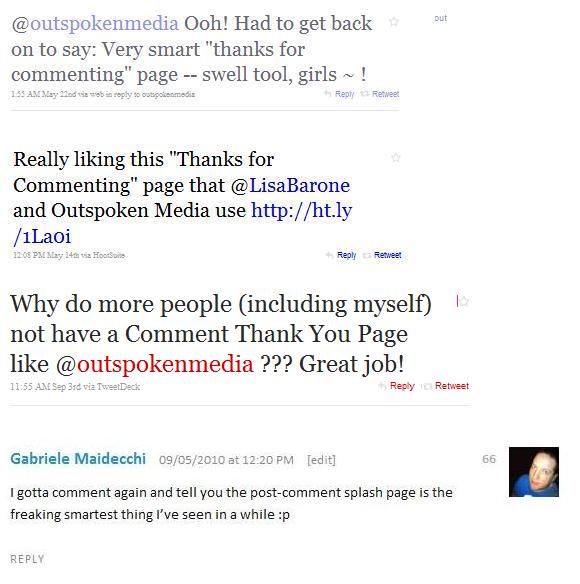
[These are mostly older examples because Twitter Search took the morning off. Dear Twitter Search, please fix yourself before I wreck yourself.]

Every week I receive tweets/emails/new blog comments from new community members who love that page. They love it because they weren’t expecting it and because it’s warm. Usually when you leave your first comment on a new blog, nothing happens. Maybe you’re taken to a page that says your comment was accepted or has been placed in moderation. However, there’s no life there. We try to use our Thanks For Commenting page to keep the relationship going. We thank people for spending their time with us, encourage them to keep doing it, and we do it in a way that doesn’t make them (or us) feel slimy. The page is written to be personable and make people feel like we’re reaching out as friends. I can tell you the response has been more powerful than I ever would have imagined.

The page surprises people. And they really like it.

People like small surprises. They like it when you do the little things that show you’re paying attention and that you care. Surprise your audience by appearing where they wouldn’t expect you, making the little things big, and going further than your business has to. Our personalized Thanks for Commenting page is just one way that Outspoken tries to ‘shock & aw’ its audience. We’d oprah all of your cars if we could but, well, it’s just not feasible this year. Maybe in 2011.

What are you doing to shock & aw your audience? What little surprises do you lay out for people to find? What have you seen other sites do that you want to steal emulate? I’d love it if you’d share some in the comments today.


About the Author

Lisa Barone

Lisa Barone is the Chief Branding Officer of Outspoken Media. She's also a very active Twitterer, much to the dismay of the rest of the world. Connect with Lisa on Google+ and Facebook.

Get social with Lisa at Twitter

Share this Post

Stay Connected

Subscribe to the Outspoken Media feed via RSS or email and follow Outspoken Media on Twitter!

Related Posts

{ 52 comments… read them below or add one }

1 Jason Wietholter September 7, 2010 at 12:19 PM

Sometimes the details are the toughest things to get just right, but a lot of times they are the most important. They are what set you apart from the crowd.

One idea in particular that I have seen are very personalized email autoresponders. The architect of the order acknowledgment system took the time to re-write the template email with some very personable text. Another example would be well-designed/informative 404 pages.

Any place you can eliminate the robotic nature of the response and develop something personal, the better.

Reply

2 Lisa Barone September 7, 2010 at 1:44 PM

Totally agree. I’m not sure how I feel yet about personalized automated email responders. I think if you’re going to send someone an email, I’d much rather create the email from scratch. Obviously there’s a “core” message you’ll be sending, but I typically raise an eyebrow anything there’s an automated anything that gets sent out based on the completion of a certain task (ie left a comment). It’s interesting, though. And definitely, the more you can make something NOT sound like a robot wrote it, the better.

Reply

3 tara - scoutie girl September 7, 2010 at 12:21 PM

oh my goodness! thank you! I’ve been thinking about doing this same thing. But I thought I’d have to figure out how to code the redirect myself. Of course – there’s a plugin for that!

Thank you – I think it’s such a great idea. Yes, it’s warm and inviting and it allows me to concentrate on providing a platform for discussion and then rewarding those who engage me.

Brilliant. Thank you.

Reply

4 Lisa Barone September 7, 2010 at 1:45 PM

Glad you found it useful. Isn’t it nice that almost every time you think you have to build something you find out someone else already has? :)

Reply

5 Chris Jordan September 7, 2010 at 12:23 PM

I had to comment, to check out this page :)

Reply

6 Lisa Barone September 7, 2010 at 1:45 PM

Was it good for you? ;) I did link to the page so people wouldn’t feel like I was making them comment to play!

Reply

7 Kristin September 7, 2010 at 12:24 PM

Thanks for the info about the plugin! I wondered how you guys had set that up. I think it’s a great addition to any blog!

Reply

8 Lisa Barone September 7, 2010 at 1:46 PM

i get a lot of people asking me how we do that/what plugin it is so I thought I’d just throw it out there once and for all. It’s Outspoken’s best kept secret. ;)

Reply

9 Kristin September 8, 2010 at 5:45 PM

Thanks again! I went home and installed it almost instantly!

Reply

10 Alan Bleiweiss September 7, 2010 at 12:24 PM

Either I’ve seen your thanks page so many times I don’t recall seeing it, or it only comes up the first time you comment, or more likely, you intentionally wrote an “if Alan, skip the thanks” script :-) LOL

Seriously I like the concept though. Personally, I do my best, as you do, to engage people who comment – actually reply with something intelligent – because I think that doesn’t happen often enough as I go about my effort to comment around the web. Of course there are infinite challenges to it, most especially not wanting to force a reply, not being able to reply to every single comment…

Here’s one that this article caused me to come up with just now – What about the concept of awarding someone some sort of fun prize, but not telling people in advance you’re going to do that? I’m gonna have to consider doing it because it would be a great way to say thanks and may even generate some buzz…

Reply

11 Lisa Barone September 7, 2010 at 1:48 PM

Oh, maybe I should have been more clear. The Thanks For Commenting page ONLY comes up the first time you comment/register a new email address. It’s a little welcome mat. You won’t see it every time you leave a comment.

As for the prize idea – it can work. I’d be a little worried that, as people find out about it, they’ll take to commenting just so they could possibly win a prize. I do on occasional send emails to thank people for commenting or for bringing a different side of the conversation. I prefer doing that over blog door prizes. :) But It could definitely work for the right blog.

Reply

12 Gabriele Maidecchi September 7, 2010 at 12:27 PM

Haha when I read the title of this post I was like “wow that’s exactly what I commented about the other day”, and there I am :p
Kudos to you, I gotta repeat myself, very nice idea! Every step to drag your users closer to your human side is the best way to get a meaningful user base.

Reply

13 Lisa Barone September 7, 2010 at 1:49 PM

Haha, weird how that happens, isn’t it? Hope you don’t mind we used your name and face. It was more cumbersome to cut it out than with the tweets. And thanks for the compliment!

Reply

14 Gabriele Maidecchi September 7, 2010 at 5:23 PM

Of course I don’t mind, and you’re welcome!

Reply

15 Elmer Boutin September 7, 2010 at 12:35 PM

Thanks for passing along the tip on that plug in. This is a great idea.

Reply

16 Patty K September 7, 2010 at 1:07 PM

Thanks for the plugin info! I too was pleasantly surprised by the comment thank you page…it’s an awesome idea.

Reply

17 Matthias Hager September 7, 2010 at 1:26 PM

I think your site was one of the first places I noticed the “Thank you for commenting” page. I’ve seen it a few other places since. It’s a great way to improve customer retention, kind of like giving a welcome package or free t shirt the first time a customer walks in your actual office.

Taking that wow factor further, I’ve seen Blekko doing a great job of this recently. They will occasionally toss a free t shirt to someone who mentions them on Twitter. SEOmoz did it during a recent webinar. An audience member gave them a great suggestion for their new web app, and they responded by sending him a free month of pro membership.

It’s a great way to generate a little buzz and make for satisfied customers.

Reply

18 Lisa Barone September 7, 2010 at 1:50 PM

Cool, some nice examples there. Maybe one day Outspoken Media will print T-shirts and we can throw them out to people. :)

Reply

19 Derek September 7, 2010 at 1:46 PM

Am I leaving a comment just to test out the thanks for commenting page? Yep! Thanks for pointing me towards this plugin Lisa! I’ve been looking for something like this for a while (obviously not actively looking).

Reply

20 Ludy Amano September 7, 2010 at 2:08 PM

Wanna test the thanks for commenting page ;-)

Reply

21 Rebecca September 7, 2010 at 3:38 PM

I remember the page and being surprised by it. But I never connected the fact that after that page I made sure to come back to your site again and again. I just chocked it up to quality content. Now looking back, I wonder if I had some warm fuzzies that I didn’t really realize.

It’s a great idea, and I like the concept of surprising your readers. Now I can put my mind toward coming up with something surprising and unique. I’ll report back in a year when I’ve thought of it.

Thanks again.

Reply

22 Caron Mosey September 7, 2010 at 4:15 PM

Thanks for all you do for your readers. I’ve learned so much from you!

Reply

23 Donovan Owens September 7, 2010 at 4:30 PM

I love this post and the thought of the comment thank you page. I’m jumping on that right now. Thank you for the great information.

Reply

24 Corey September 7, 2010 at 8:46 PM

Okay, this post definitely intrigued me into posting a comment! Dang it….no more lurking for me!

Thanks for all you do on this blog, Lisa. I look forward to every post.

Reply

25 Lori September 7, 2010 at 9:25 PM

Oh! So psyched to have that plugin, I loved the comment thanks as well — especially because I do hesitate often before commenting on a new blog/community – the warm and genuine thanks felt so inclusive and welcoming.

Reply

26 @TheGirlPie September 7, 2010 at 11:30 PM

Ooh! Had to click right through from your
feed to say: isn’t it cool when sharing
outta-the-blue-delight ripples out so other
kids do it, too? Thanks for another swell post ~ !

Reply

27 Mary E. Ulrich September 8, 2010 at 7:39 AM

Okay, Lisa–you got my interest. Now I have to check out your response. What a great idea to get the conversation going.

Reply

28 Roger Lear September 8, 2010 at 7:40 AM

Hi Lisa – great post. Three things come to mind …

1. Congrats on making this explicit. It’s the kind of thing that a lot of people take for granted, but that others won’t see unless it’s pointed out to them. (Even then, some may still not get it !)

2. Thanks for the steer on the plug-in. (It seems like there truly is a plug-in for everything !)

3. After learning that there was such a mechanism, of course I just had to comment to see what happens when I leave a comment !

Roger

Reply

29 Joost de Valk September 8, 2010 at 9:34 AM

Ok Lisa, so you did a far better job of explaining what the plugin does than I do on the plugin page :) I’m going to have to go back and write a proper explanation, or maybe there is a certain someone who’d want to do that for me? :)

Reply

30 deniseschlez September 8, 2010 at 4:39 PM

now, i had to leave a comment to see your page, great post, I love the way you write.
cheers
Denise

Reply

31 Ms. J September 8, 2010 at 10:09 PM

First time on your site and this is where I land. Thank you!

Reply

32 Kristi September 9, 2010 at 10:18 PM

Thank you! I started a new job last week so it was nice to have this reminder of what plugin to go install for the new blog I’m setting up. :) Always appreciate the good tips.

Reply

33 Dan M September 10, 2010 at 10:30 AM

The thanks-for-commenting page was actually what pushed me to finally subscribe to the blog. It’s a really smart idea, especially since your blog probably gets a lot of through-traffic from sources like Google or Twitter (which is how I found it).

Anyway, something I do every now and then to shock and aw is post an update on Friday. Normally my blog only updates on Monday, but if I have something silly/funny to share that wouldn’t normally make it into a full post, I’ll make a super-short post about it on a Friday. This sort of break in the routine usually gets a few laughs and occasionally a better response than my “real” posts.

At the risk of sounding a bit spammy, today is one of those Fridays, featuring a ridiculous picture of me from a recent trip to Las Vegas. So if you need a quick pick-me-up, here it is: http://tinyurl.com/35pook9

Reply

34 Christy September 28, 2010 at 10:40 AM

i can’t wait to see the thanks for commenting page

Reply

35 JuliePower October 12, 2010 at 11:28 AM

hi Lisa, been a follower of you for ages on Twitter and have heard you speak, and be admired by others, at trades shows. Well deserved admiration.

I love this idea … and am making this comment because:
a. want to see it myself
b. am hoping you don’t mind if I write about it for my day job .. editing a print publication about marketing (a few still exist on paper) as a great example of how to surprise and amaze customers.
thanks

Reply

36 Travis Robertson November 19, 2010 at 8:42 AM

This is a great reminder to always look for ways to WOW the community. Sure, I’m going to have to check out this plugin.

However, there’s always more that we can do to really deliver that shock and awe experience. Many thanks on the great post!

Reply

37 Marion Ryan July 8, 2011 at 5:22 AM

Lisa, thanks for sharing your ‘new comment’ page, it’s always nice to see someone who’s taken a bit of extra time over this sort of detail, that’s what makes you memorable.

I was impressed enough to want to subscribe by email to your feed but the ‘email subscribe’ link in the sidebar is taking me to a 404. The RSS reader is working fine though. Might just be my computer not playing ball with you but thought I’d mention it in case it needs a fix.

Marion

Reply

38 Lindsey (aka modchik) July 26, 2011 at 7:49 PM

check it out for myself I would like to see a screen shot but there isn’t one on the plug-ins site.

Reply

39 Dennis Carpenter August 18, 2011 at 10:02 PM

Got to test this out!

Reply

40 Moe August 24, 2011 at 4:01 AM

Just wanna see thanks for commenting. Great job!

Reply

41 Beth Agnew (@Professorsan) September 5, 2011 at 1:45 PM

Such a great idea, thanks! As they say, God is in the details. When you treat every interaction with your followers, customers, visitors as a chance to engage them more, you are building valuable relationships that can pay off in unexpected ways. I really appreciate all your posts — always something valuable.

Reply

42 Henning September 6, 2011 at 5:48 AM

Awesome idea that came on my radar by Chris Garrett and his Authority Blogging webinars.

Reply

43 Anne September 11, 2011 at 11:43 PM

I also had to comment to check this out! it’s a really nice idea :O)

Reply

44 Melissa September 24, 2011 at 7:57 PM

just stood up my blog 3 months ago and I continue to learn new things every day. thanks for the great idea, can’t wait to implement

Reply

45 Isaac October 2, 2011 at 6:04 PM

I just want to see this commenting page example.

Reply

46 KBharath @ HDBloggers October 9, 2011 at 12:09 PM

Thanks for this Plugin.

Reply

47 Achisto October 26, 2011 at 4:34 PM

Great article and thanks for the Link to the Plugin. And to be honest I’m a little bit curious to see the Plugin “in action” ;)

Reply

48 Julian Fernandes November 8, 2011 at 11:12 AM

I just came to see how the thanks page looks like. Awesome article i must say and it seems like an awesome plugin.

But i do have a question: Does it work with comment systems like Intense Debate, Facebook Comments and Disqus?

Reply

49 Jeff Witt November 8, 2011 at 2:13 PM

Two things:
1. I want to see your thank you page. :)
2. I like your angle on surprising (pleasantly surprising) your visitors.

Hope you don’t mind, but I’m going to “emulate” this.

Reply

50 Roxanne December 4, 2011 at 11:06 PM

Hey! Thanks for this tip! I’ve just added this to my blog and I’m waiting for the positive results!

xoxo,
Roxanne

Reply

51 ReXTaN January 25, 2012 at 2:20 PM

I want to see your thank you page. :)

Reply

52 Ally @ Om Nom Ally.com February 1, 2012 at 11:43 PM

I had to comment, because I want to see the splash page!

Reply

Leave a Comment

You can use these HTML tags and attributes: <a href="" title=""> <abbr title=""> <acronym title=""> <b> <blockquote cite=""> <cite> <code> <del datetime=""> <em> <i> <q cite=""> <strike> <strong>

Want to add a picture to your comments here on Outspoken Media? Upload a picture at Gravatar to make it happen.

By clicking "submit" below, you are agreeing to abide by our comment policy.

Comments links could be nofollow free.

Previous post:

Next post: